Welcome to OfficeFloor

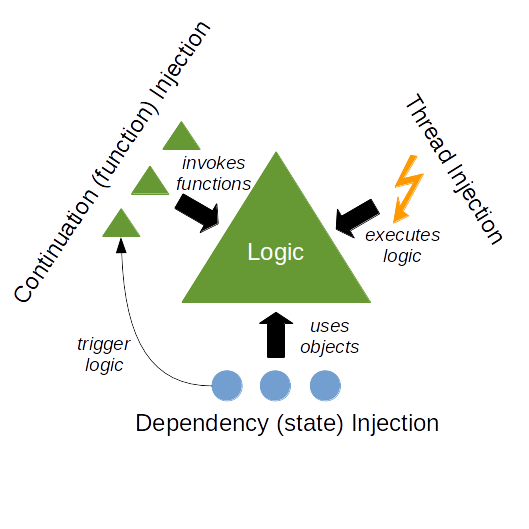
OfficeFloor is an Inversion of Control 2.0 implementation that focuses on multi-threaded dependency injection into methods rather than into objects and improves on existing dependency injection frameworks by letting you specify the Thread to execute the method - thereby really adhering to the "Hollywood Principle" (don't call us, we "really" will call you).

OfficeFloor is freely distributed under GPL (LGPL also available on request) and the source is available here.

Features

  • Combines the object oriented ease of programming with the multi-threaded performance of functional programming.
  • Provides both auto-wiring of dependencies and manual graphical configuration.
  • WoOF (Web on OfficeFloor - http://webfloor.org) provides simplified web application development that allows easy integration with WSYWIG web design tools.
  • JEE Servlet Filter that enables introducing OfficeFloor functionality to your existing applications without change.
  • Integration with frameworks such as Spring, Hibernate and GWT to simplify integrating OfficeFloor functionality into your existing applications.

Example Capabilities

The following code provides a simple example of OfficeFloor capabilities:

// OfficeFloor source to create an in process HTTP Server (useful for testing).
// Note that applications are normally configured using the WoOF graphical configuration.
HttpServerAutoWireOfficeFloorSource server = new HttpServerAutoWireOfficeFloorSource();

// Add a dynamic web page (PageLogic is just a POJO)
server.addHttpTemplate("page.html", PageLogic.class);

// Add configured DataSource for dependency injection
server.addManagedObject(DataSourceManagedObjectSource.class, null, DataSource.class).loadProperties("datasource.properties");

// Assign Team (specific thread pool) responsible for executing the methods with a DataSource dependency
server.assignTeam(LeaderFollowerTeamSource.class, DataSource.class).addProperty("size", "10");

// Start the HTTP Server
server.openOfficeFloor();

Further examples can be found in the Quick Tutorials.

Graphical Configuration

The above example was limited to code configuration. The further value of OfficeFloor lies in its graphical configuration, which is the more preferred means of configuration.

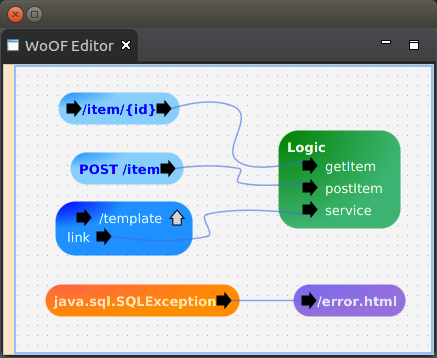
An example graphical configuration from WoOF (Web on OfficeFloor) for web site navigation is:

Example graphical configuration of WoOF.

To use the graphical configuration install the OfficeFloor Eclipse plug-ins.

Find out more

To find out more about OfficeFloor:

  • Check out the Quick Tutorials for 2 minute overviews of various features and capabilities of OfficeFloor.
  • Ask questions by catching us online (click on bottom right hand box - many thanks goes to Woopra for this great service).